Showing posts with label cisco. Show all posts

Thursday, April 30, 2015

Planning network element patches

As it happens, sometimes security engineers need to grab networkers and make them patch all those vulnerabilities that sysadmins keep fixing as soon as they get out.
With systems, this all is quite easy as there are almost no restrictions (besides compatibility), but network elements like routers or switches have limited resources and updates are not broken down to smaller components, but are usually just one big file containing everything from kernel to all the "applications" or processes and supporting utilities.
In this post, I would try to describe the process of planning such upgrade.

Inventory phase

First step is to find out what needs to be upgraded, as in later phases this information is quite important for selecting the software version as well as the process of the upgrade.
Following information needs to be collected about each router/switch/firewal/etc.:
  • Hardware type and version (not just the type printed on the device chassis, but also slot/port count information. For example "Cisco Nexus 56128P Switch" or Catalyst 2950T 24 Switch)
  • Memory information (RAM as well as storage or flash memory size is important)
  • Management IP (or IP address via which the software is going to be uploaded, as pcmcia or console modem options are usually not very fast)
Memory information is needed to find out if the software can run in the memory the hardware provides as well as if the software can be stored on the memory provided. Some devices have only one memory and split it in the two types (like Cisco 7200 routers) , while others have dedicated storage memory and RAM.

Software selection phase

After having all the information from previous phase, we can move on to finding the appropriate software version, that each device can support and contains the fixes needed.
Each software vendor has at least one web-tool that provides the information (or even the software download) needed:
Sometimes the vendors have links directly from security advisories or notifications, but it's not necessarily there, so the safest way to get the software and information about it is via the download pages.

Some vendor make it easy to select the latest version, while others have a set of sub-versions indicating feature upgrades or just patches; standard or extended support; early deployment or limited deployment; etc. Each vendor has a document describing what each part of the version means, and it can also be different for each product series.

Besides having the choice of software to download, there's also release notes or readme document for each version, where the vendor describes:
  • how to perform the upgrade 
  • what are the pre-requisites (which platforms and current software versions are compatible)
  • what new features are introduced and old ones removed
  • what issues/bugs/problems were resolved with that software version
  • what caveats were identified with this version
If the current version is way too old (by 1 or several major version releases), it might be needed to perform several upgrades in order to ensure that configuration is properly translated to new syntax or with new features. This should be described in the pre-requisites in order to ensure trouble-free upgrade. This phase has to be repeated for each of the versions that need to be installed before the latest one can be applied.

With constant change and improvements in the network field, features come and go, so it's necessary to watch out for removal or modification of features used (default deny could change to allow any; or statically configured IPSEC local networks might be auto-negotiated in newer version).

List of bugs resolved is a good source for identifying whether the new version would fix the recent vulnerabilities flowing in the wild. This might help with vulnerability management tickets or anomaly reports that are overdue.

And the caveats are good to know problems that were identified during vendor testing of the new version. When the local conditions are similar as those described in caveat, this might put a stop to the installation of that version (or the upgrade).

Software validation

With all the information collected from previous phases, only very brave people would install the software right away into production.
A lot of companies have labs, where new versions can be tested before installing them into production. In larger data-centers there could be canary elements for testing, where this could be done.
Goal of validation should be to ensure:

  • current configuration syntax is fine under new version
  • all required features are going to work as expected (with the same licences)
  • redundancy mechanisms would work (no timer defaults or protocol defaults changed)
  • monitoring functions get the same format of data as before (no snmp OID or syslog message format  or API changes)
  • migration/upgrade plan is not going to cause an impact (some systems require same version of clustered elements to work)

Whether all this is automated or done manually by verification team with defined validation test-cases, it's up to each company to decide, but what most of the IT managers wouldn't like is to have total outage of core network after software upgrade of central router or switch.

And let's not forget to verify the hash of the downloaded software (if the vendor offers it on the download website), as network elements are the best place for MiTM attacks.

If you know of anything else I missed, let me know and I'll update the post.

Tuesday, August 26, 2014

Private VLANs on NX-OS

In the field of network security there are not just firewalls and IDSs, there are also technologies and features  that can be used as security controls (like network segmentation or access control) as well.

Private vlans (RFC 5517) is one such technology that is very helpful in case where one server needs to see all the clients, but clients should not see each other. Typical scenarios where this can be used is a backup network (one NAS or backup server and many clients) or OOB monitoring&control network (one NMS or AAA server/station and many network or server elements). There might be some fringe scenarios of filtered networks that need to use a common resource (a gateway/licence server/..), but these are not as common as previous cases.

To state some basics about private vlans, there are 3 types of vlans:
  • Primary vlan, containing ports that can talk to any other ports (promiscuous, isolated or community ports)
  • Isolated vlan, containing ports that can only talk to promiscuous ports
  • Community vlan, containing ports that can speak to promiscuous ports, but also to the ports in the same community vlan.


For better explanation how private vlans work, it's better to visit the RFC document linked above or one of the referenced sites at the end of this blog entry.

Configuration

The configuration steps are listed in the appropriate order, as in several cases it is necessary to shut down existing interfaces in order to put in the private vlan configuration when configuring it in different order than usual.

Enabling the feature

Luckily this feature doesn't require licence, so it can be just enabled:

feature private-vlan

To allow propagation of private vlans to other switches, other features are required (although they should be enabled already to have that functionality):

feature fex trunk

VLANs definition

Let's create  a primary vlan with ID number 100 and associate it with secondary vlans:

Vlan 100
private-vlan primary

Next let's create a community vlan 101:

Vlan 101
private-vlan community


And vlan 102 as isolated vlan:

vlan 102
private-vlan isolated


To verify that vlans exist the following output should be observed:

# sh vlan private-vlan
Primary  Secondary  Type             Ports
-------  ---------  ---------------  -------------------------------------------
100                 primary
         101        isolated

         102        community

Now with vlans existing we can associate it with the primary vlan:

Vlan 100
private-vlan associate 101,102

So for verification this is what the show command should show:

# sh vlan private-vlan
Primary  Secondary  Type             Ports
-------  ---------  ---------------  -------------------------------------------
100      101        isolated
100      102        community

Note: the vlan configuration is applied and shown correctly only after exiting the vlan configuration area.

Promiscuous port

With all vlans defined, we can proceed with configuration of appropriate ports.

int gigabitethernet 1/1
Switchport mode private-vlan promiscuous
Switchport private-vlan host-association 100 101-102

The association specifies the primary vlan first and then the list of secondary vlans that correspond to it.
Also it is recommended to use bpdu guard, as in today's world of virtualized switches on hosts, one never knows what might show up on ingress..

In order to verify the result the following would show up:

# sh vlan private-vlan
Primary  Secondary  Type             Ports
-------  ---------  ---------------  -------------------------------------------
100      101        isolated          Eth1/1
100      102        community

NOTE: Promiscuous ports can only be configured on Nexus 5k physically, it doesn't work on ports on fabric extenders (Nexus 2k).

Isolated port

Configuration of isolated port is a very similar to promiscuous port:

int gigabitethernet 1/2
Switchport mode private-vlan host
Switchport private-vlan host-association 100 102

Association specifies only one secondary vlan, which corresponds to the isolated vlan that the port should be in.
In order to verify the result the following would show up:

# sh vlan private-vlan
Primary  Secondary  Type             Ports
-------  ---------  ---------------  -------------------------------------------
100      101        isolated          Eth1/1,Eth1/2
100      102        community

Community port

And this is the configuration of a community port (it looks the same as isolated port):

int gigabitethernet 1/3

Switchport mode private-vlan host

Switchport private-vlan host-association 100 101

In order to verify the result the following would show up:
# sh vlan private-vlan
Primary  Secondary  Type             Ports
-------  ---------  ---------------  -------------------------------------------
100      101        isolated          Eth1/1,Eth1/2
100      102        community         Eth1/3

Trunk port configurations

For standard transit trunks, the VLANs look just like 2 separate VLANs, as the magic happens only on the end-points.
There are other trunk port types, which are used when trunking with non-"PVLAN aware" devices. Main point is that the frame forwarding which happens on secondary vlan has to be also sent to primary vlan and vice versa. This happens by re-writing the VLAN tags depending on the pairing of the interface.
There is a article on Cisco support forum describing the special cases where this could be used.

Promiscuous trunk
Beginning with Cisco NX-OS Release 5.0(2), on the Cisco Nexus Series devices, you can configure a promiscuous trunk port to carry traffic for multiple primary VLANs. You map the private VLAN primary VLAN and either all or selected associated VLANs to the promiscuous trunk port. Each primary VLAN and one associated and secondary VLAN is a private VLAN pair, and you can configure a maximum of 16 private VLAN pairs on each promiscuous trunk port.

Isolated or secondary trunk
Beginning with Cisco NX-OS Release 5.0(2) on the Cisco Nexus Series devices, you can configure an isolated trunk port to carry traffic for multiple isolated VLANs. Each secondary VLAN on an isolated trunk port must be associated with a different primary VLAN. You cannot put two secondary VLANs that are associated with the same primary VLAN on an isolated trunk port. Each primary VLAN and one associated secondary VLAN is a private VLAN pair, and you can configure a maximum of 16 private VLAN pairs on each isolated trunk port.

NOTE2: Portchannel interfaces can't be used for private VLANs.

References

Tuesday, June 3, 2014

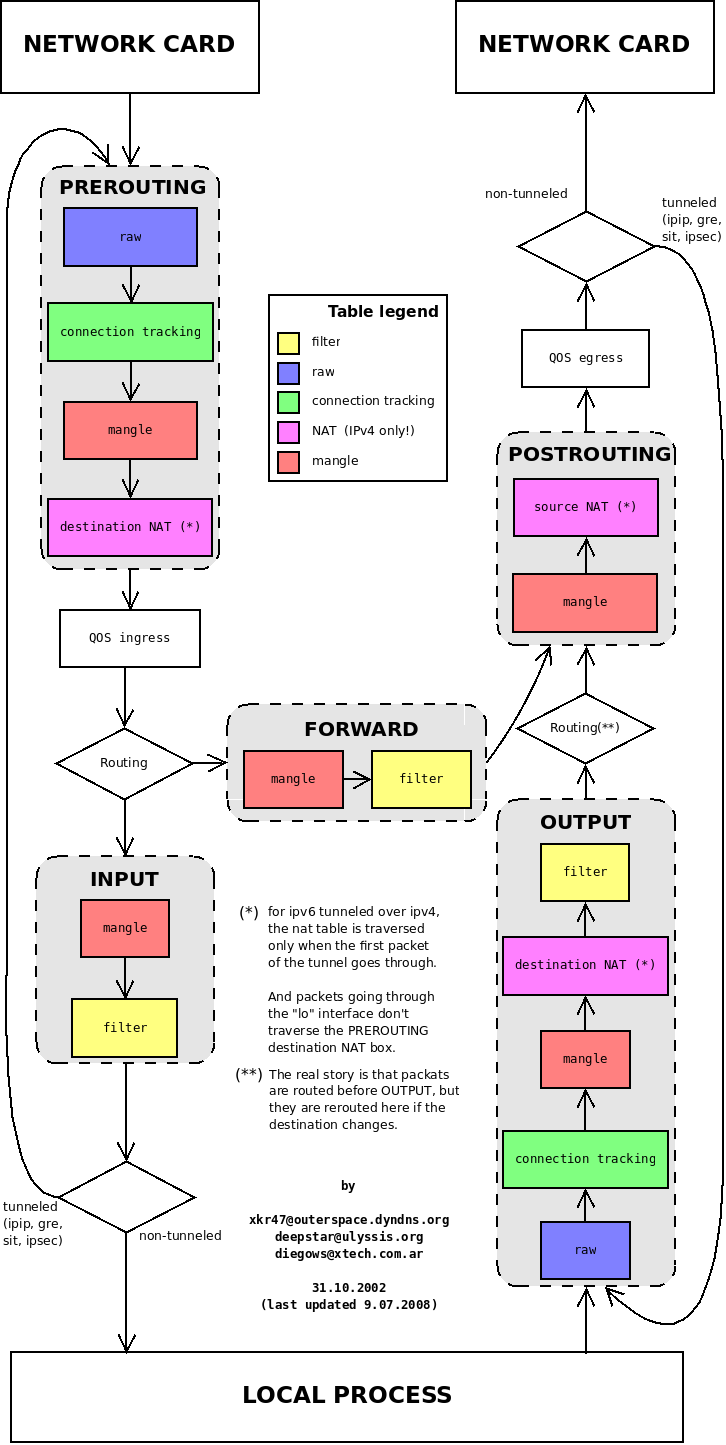
Packet processing inside firewalls

During one packetpushers podcast, i was reminded of how useful it was for me when building or migrating firewalls knowing which step of the packet processing comes first.
As some vendors or technologies prefer doing thins differently than the others, migration of the configuration is not that straightforward.
This blog entry should summarize the information i've used in the past and keep as a reference for any future work.

Cisco

In ASDM on all ASA firewalls there is also a packet tracer, where the flow is illustrated for troubleshooting.

Juniper

PaloAlto

IPTables

The new NFTables should have the same concept (some chains might be called different differently) as IPTables, but I was unable to find anything specifically about it yet..

Checkpoint

Fortigate


There are other sources that describe similar behavior as mentioned above, or in case of Sonicwall a patent describing the process (that doesn't guarantee they also use it). But most of them look very similar, so it is easy to predict what new vendor or type of firewall would do when processing a packet.
With this in mind, firewall troubleshooting becomes a simple process of checking the stages in which packet can be.