Tuesday, June 3, 2014

Packet processing inside firewalls

During one packetpushers podcast, i was reminded of how useful it was for me when building or migrating firewalls knowing which step of the packet processing comes first.
As some vendors or technologies prefer doing thins differently than the others, migration of the configuration is not that straightforward.
This blog entry should summarize the information i've used in the past and keep as a reference for any future work.

Cisco

In ASDM on all ASA firewalls there is also a packet tracer, where the flow is illustrated for troubleshooting.

Juniper

PaloAlto

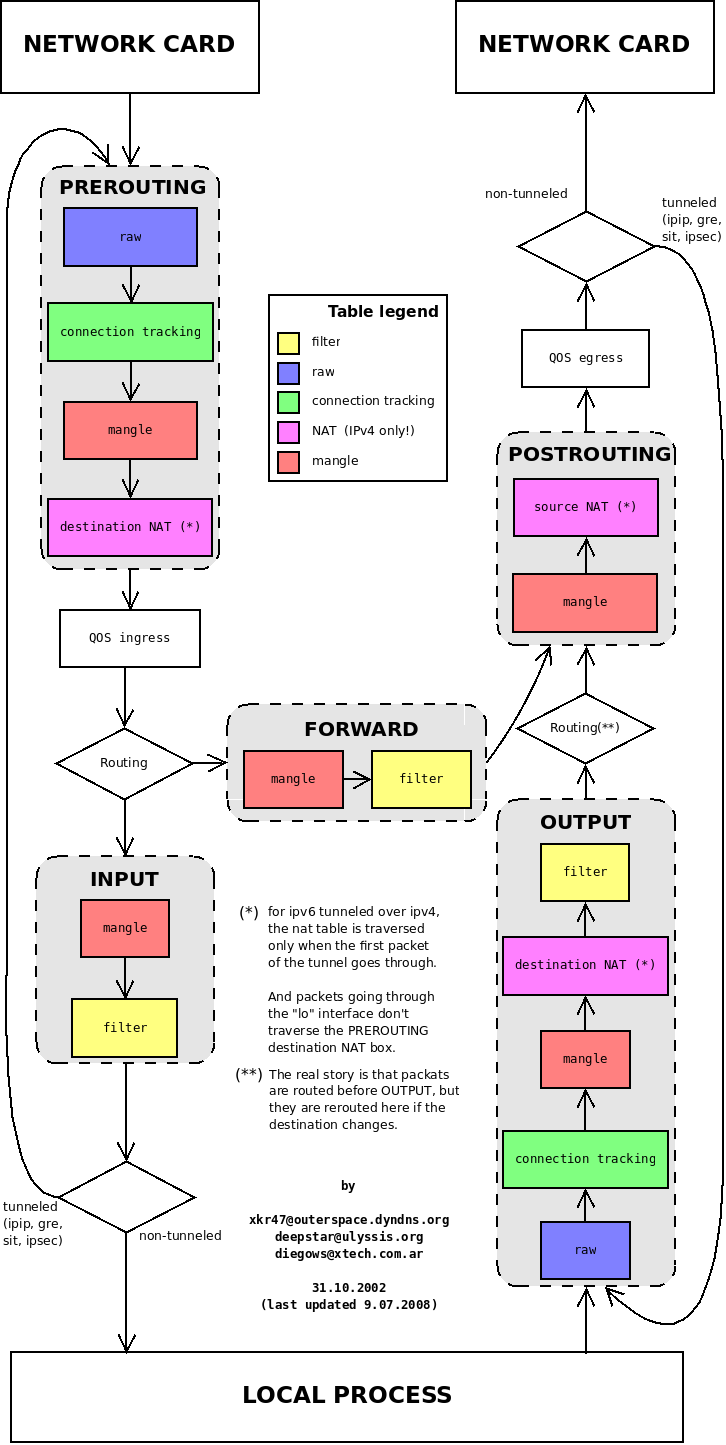
IPTables

The new NFTables should have the same concept (some chains might be called different differently) as IPTables, but I was unable to find anything specifically about it yet..

Checkpoint

Fortigate


There are other sources that describe similar behavior as mentioned above, or in case of Sonicwall a patent describing the process (that doesn't guarantee they also use it). But most of them look very similar, so it is easy to predict what new vendor or type of firewall would do when processing a packet.
With this in mind, firewall troubleshooting becomes a simple process of checking the stages in which packet can be.

Thursday, April 10, 2014

Heartbleed (CVE-2014-0160) vulnerability overview

Vulnerability description

OpenSSL released a bug advisory (CVE 2014-0160) about a 64kb memory leak in their library specifically in packet processing code for  the heartbeat extension (RFC6520).

The heartbeat consists of a request packet including a payload; the other side sends a response containing the same payload (plus some other padding).
In the packet sent by the attacker there is a payload size indicator, which is then used for sending the response packet back. Due to the fact that packet that was received is much smaller than specified in the payload size, the packet response function reads and sends the memory after the packet data.
This allows attacker to read up to 64kb memory without a trace (heartbeat is not logged) and can be repeated many times to increase the probability of containing valuable information.

More details (in FAQ format) can be found on a website created for this bug.

Vulnerability status of different versions of OpenSSL library:
  • OpenSSL 1.0.1 up to 1.0.1f (inclusive) are vulnerable
  • OpenSSL 1.0.1g is NOT vulnerable
  • OpenSSL 1.0.0 branch is NOT vulnerable
  • OpenSSL 0.9.8 branch is NOT vulnerable

Timeline

Bug was introduced to OpenSSL in December 2011 and has been in the code since OpenSSL release 1.0.1 on 14th of March 2012. OpenSSL 1.0.1g released on 7th of April 2014 has the bug fixed.

Testing

Some recommendations suggest evaluating the version of the openssl library via the client openssl version, but that only shows the library version and not necessarily version used by a webserver (can be statically linked).

Although there are many websites that claim to test this vulnerability (by using HTTPS protocol to access the given IP address), i would not recommend using them as storing the requests in the log would also create a nice list of vulnerable websites.

There is a number of offline tools and scripts that can do the same test as well:


There was also a mass-test performed on top 10000 sites, to see if they are vulnerable. Users of these websites should consider changing passwords/keys in order to protect their digital identity.

Vendor status

As the library is used in many products, I would focus on network vendors here:

Note: The bug is in the code of heartbeat function, so I would expect it to be used in protocols or areas, where keep-alive is done. I haven't seen any information about other services like IMAP/FTP or others that use STARTLS.

Detection configuration


People at Sourcefire vulnerability research published the following IDS signatures for snort:

alert tcp $EXTERNAL_NET any -> $HOME_NET 443 (msg:"SERVER-OTHER OpenSSL SSLv3 heartbeat read overrun attempt"; flow:to_server,established; content:"|18 03 00|"; depth:3; dsize:>40; detection_filter:track by_src, count 3, seconds 1; metadata:policy balanced-ips drop, policy security-ips drop, service ssl; reference:cve,2014-0160; classtype:attempted-recon; sid:30510; rev:2;)

alert tcp $EXTERNAL_NET any -> $HOME_NET 443 (msg:"SERVER-OTHER OpenSSL TLSv1 heartbeat read overrun attempt"; flow:to_server,established; content:"|18 03 01|"; depth:3; dsize:>40; detection_filter:track by_src, count 3, seconds 1; metadata:policy balanced-ips drop, policy security-ips drop, service ssl; reference:cve,2014-0160; classtype:attempted-recon; sid:30511; rev:2;)

alert tcp $EXTERNAL_NET any -> $HOME_NET 443 (msg:"SERVER-OTHER OpenSSL TLSv1.1 heartbeat read overrun attempt"; flow:to_server,established; content:"|18 03 02|"; depth:3; dsize:>40; detection_filter:track by_src, count 3, seconds 1; metadata:policy balanced-ips drop, policy security-ips drop, service ssl; reference:cve,2014-0160; classtype:attempted-recon; sid:30512; rev:2;)

alert tcp $EXTERNAL_NET any -> $HOME_NET 443 (msg:"SERVER-OTHER OpenSSL TLSv1.2 heartbeat read overrun attempt"; flow:to_server,established; content:"|18 03 03|"; depth:3; dsize:>40; detection_filter:track by_src, count 3, seconds 1; metadata:policy balanced-ips drop, policy security-ips drop, service ssl; reference:cve,2014-0160; classtype:attempted-recon; sid:30513; rev:2;)

alert tcp $HOME_NET 443 -> $EXTERNAL_NET any (msg:"SERVER-OTHER SSLv3 large heartbeat response - possible ssl heartbleed attempt"; flow:to_client,established; content:"|18 03 00|"; depth:3; byte_test:2,>,128,0,relative; detection_filter:track by_dst, count 5, seconds 60; metadata:policy balanced-ips drop, policy security-ips drop, service ssl; reference:cve,2014-0160; classtype:attempted-recon; sid:30514; rev:3;)

alert tcp $HOME_NET 443 -> $EXTERNAL_NET any (msg:"SERVER-OTHER TLSv1 large heartbeat response - possible ssl heartbleed attempt"; flow:to_client,established; content:"|18 03 01|"; depth:3; byte_test:2,>,128,0,relative; detection_filter:track by_dst, count 5, seconds 60; metadata:policy balanced-ips drop, policy security-ips drop, service ssl; reference:cve,2014-0160; classtype:attempted-recon; sid:30515; rev:3;)

alert tcp $HOME_NET 443 -> $EXTERNAL_NET any (msg:"SERVER-OTHER TLSv1.1 large heartbeat response - possible ssl heartbleed attempt"; flow:to_client,established; content:"|18 03 02|"; depth:3; byte_test:2,>,128,0,relative; detection_filter:track by_dst, count 5, seconds 60; metadata:policy balanced-ips drop, policy security-ips drop, service ssl; reference:cve,2014-0160; classtype:attempted-recon; sid:30516; rev:3;)

alert tcp $HOME_NET 443 -> $EXTERNAL_NET any (msg:"SERVER-OTHER TLSv1.2 large heartbeat response - possible ssl heartbleed attempt"; flow:to_client,established; content:"|18 03 03|"; depth:3; byte_test:2,>,128,0,relative; detection_filter:track by_dst, count 5, seconds 60; metadata:policy balanced-ips drop, policy security-ips drop, service ssl; reference:cve,2014-0160; classtype:attempted-recon; sid:30517; rev:3;)


Note: these signatures report only heartbeat use with large data size, not actual ex-filtration of  passwords or other sensitive content. So it is useful to detect vulnerable servers in order to patch them. Also they don't inspect any other services than https that might be vulnerable.

Mitigation

There are several options that can mitigate this vulnerability:
  • upgrade openssl library to 1.0.1g or higher (or downgrade to 0.9.8)
  • compile openssl library with -DOPENSSL_NO_HEARTBEATS option
  • use different ssl library 
  • use perfect forward secrecy (this does not prevent leaking of the session keys or other memory content)
  • drop packets with the heartbeat requests (or heartbeat packets larger than normal size)
As this vulnerability has potential to disclose keys and passwords used, it is recommended to change the passwords and/or generate new keys used on external websites or services using SSL in the time-frame when this code was used (since Dec 2011).

Tuesday, March 25, 2014

Offline Password Management System

Intro

In many companies the authentication management is quite easy to do. That is if they only have one IT team and simple network infrastructure. Just putting in one LDAP or AD server should do the trick, one would believe.
But the world is not always that easy. There are more complex and heterogenous environments, with multi-department/team organizations and environment segmentation, where having something like central authentication server is just not feasible.
Also for some applications or systems it might not be possible to use something like remote authentication service.
In these cases, local authentication is the only option. Which makes account/password management a bit complicated.
So let's think about such scenario, where there are lots of accounts/logins/passwords and some of them are shared others are personal and describe how such offline system could work.

Accounts and Systems

The most important task to do is to create a list of roles and systems, where these accounts (should) reside.
These systems can be anything from specific applications down to pin code for room access. As the goal is to keep track of any accounts, therefore even physical elements should be considered.
When it comes to types of accounts, there usually are two types:

Personal accounts

Personalized accounts are important part of change tracking function, auditing function and other security controls, so I expect many systems would have such accounts and tracking and maintaining such accounts can and should be done by the person owning them.


Shared accounts

Shared authentication is used in areas where only one account can have all the rights (root account) or service provider supplies only one account (support or administration account) or the account is connected with a role that is performed by whole team (monitoring or support account).
Another type of shared account is system accounts, where one application needs to authenticate to other (e.g. client(s)->server relationship).


Changing such accounts can be difficult, as the information has to be shared with all the people that are part of the owner group. It's not a good practice to send the password unencrypted to everybody in the group, and encrypting it with one shared phrase makes it difficult to send it to new group members or those who forgot the shared encryption phrase.

Password management concept

So in order to track these accounts, the solution should be able to identify and distribute the account data only to the users that need it.
To do that, there should be 3 lists (or tables) of information:
  • list of all the accounts (on network elements, OS, applications, databases, etc.) 
  • list of all the account owners (potential account holders, can also be systems or applications that need an account)
  • list of all groups with people as members (teams, people with the same role or responsibility, etc.)
List of all accounts with systems, where they reside, is useful for identification of all the places, where changes have to be performed if one account has to change. There shall be no password stored in this list (
List of all account owners, should contain their public keys and delivery method for encrypted passwords (protocol/email/storage/ whatever the user likes).
List of all groups links account owners with accounts, so for personal accounts it would be one2one link and for shared accounts it would be one to many. For any future functionality there also can be group of groups or one2half (2 people holding part of the password each).

So application should have or use these lists to manage the account operations that are usually done in a standard IT environment.

Day-to-Day Operations 

Let's see how day-to-day operations with such a solution would look like:

New account creation

  1. identify all the systems that need to have this account
  2. generate a password 
  3. set the password on the system(s)
  4. distribute the password to all the group members

Shared account membership change

Here the question is whether to choose optimal approach (and for new addition just use the same password, but encrypt it for the new owner), or secure approach (generate new password every time there is a change in the group list). With minimum overhead I think it's better to do the later (being a security engineer afterall):
  1. add or remove person in the group list
  2. generate new password for the account
  3. set the password on the system(s)
  4. distribute the password to all the group members

Password change

This task should be the same as the new account creation.
  1. identify all the systems that have this account
  2. generate new password for the account
  3. set the password on the system(s) identified
  4. distribute the password to all the group members

Account expiry/deletion

  1. identify all the systems where this account is used or shall be deleted from.
  2. remove it from the list
  3. delete or disable the account on all these systems

Available solutions

Although I didn't spend much time testing various multi-user password management applications, I found following worth investigating:

Of course, a solution that requires constant connectivity to a password server defeats the purpose intended, so the connectivity is only required to synchronize password database for the user.

Saturday, February 15, 2014

Arista EOS VM in libvirt environment

To have another type of device in my Openflow lab, I decided to give Arista EOS a try.
First let's get the software needed to build the VM from www.aristanetworks.com/support/download
and download the boot image (aboot-xxx-veos.iso) and the flash drive (eos-xxx-veos.vmdk).
To access the download area, a registration is required, but software can be downloaded without any support contract or license ID (unlike other vendors..).

Libvirt configuration

Creating the VM profile (either via GUI or text editor) is quite straightforward if you consider the following constraints:

Network

Forums recommend at least 4 network interfaces, which should use the e1000 driver. Virtio driver doesn't work (despite the fact that drivers exist and kernel creates the device) and rtl8139 also doesn't work (module not compiled).
First configured interface is the management1-0 interface and the other ones are ethernet1, 2 and 3.
It was a bit confusing to begin with, as the ethernet interfaces can be loaded in different order (e.g. 3rd is the second defined), so it is better to compare the MAC addresses to be sure that interfaces are configured correctly.

Disk

The configuration should have only IDE controller (you have to remove SATA controller or else it won't boot).
The flashdrive image is to be configured as disk and the aboot iso image as DVD or CD drive (raw format).
First the dvd would be booted and it then loads the flashdrive disk, so boot order should have DVD as first.

Memory

Arista recommends using 1GB memory, which works quite well (and as it seems it is all used up):

[admin@vEOS1 ~]$ free
             total       used       free     shared    buffers     cached
Mem:        991516     951588      39928          0     115064     480736
-/+ buffers/cache:     355788     635728
Swap:            0          0          0

vEOS openflow configuration

Login as admin (there is no password as default )
CLI is very similar to Cisco one, so to perform any configuration you have to enter the config mode.

So lets configure the interface to talk to the controller:

vEOS1(config)>interface ethernet 1
vEOS1(config-if-Et1)>no switchport
vEOS1(config-if-Et1)>ip address 10.0.0.100/24

It's important to note that interface can't be the management interface, which on hardware is normally not part of the switching plane.
Next let's bind the switch to the controller and allow it to use the other interfaces:

vEOS1(config)>openflow
vEOS1(config-openflow)>controller tcp:10.0.0.10:6633
vEOS1(config-openflow)>bind ethernet 2
vEOS1(config-openflow)>bind ethernet 3

And delight on the result of our "hard" work:

vEOS1>show openflow
Description: vEOS1#sh openflow
OpenFlow configuration: Enabled
DPID: 0x000052540021d910
Description: vEOS1
Controllers:
  configured: tcp:10.0.0.10:6633
  connected: tcp:10.0.0.10:6633
  connection count: 1
  keepalive period: 10 sec
Flow table state: Enabled
Flow table profile: full-match
Bind mode: interface
  interfaces: Ethernet2, Ethernet3
IP routing state: Disabled
Shell command execution: Disabled
Total matched: 42 packets


Tuesday, February 11, 2014

Commemoration of the Day We Fight Back


It looks like security industry (and it's opposition) still didn't learn much from the events in the past.
Most of the security people in the field still tend to watch only the edge or ingress points of their defense perimeters.
Considering the facts that got published about Snowden or Manning case, only some are considering the internal attack vector. Despite all the statistics of it being the most probable case and with major impact, many security experts are avoiding this area.
I understand that it is difficult to get consensus about HR management and internal security measures, but this is the area that still needs some (if not most) attention. And not just from the point of security officer, but also from the management.

So despite all the disclosures about fancy gadgets, suppliers of intelligence agencies invented, HUMINT is still the most probable and valuable source (and attack vector)..
And the suggested countermeasures like encryption or non-standard OS still won't help in keeping things secret if the person working with the data decides to disclose it to unauthorized external party.

PS: As for agencies, instead of spending tax-money on developing and operating mass-surveillance tools (which also need lots of analysts to sift through the data), collecting HUMINT would provide more valuable and specific information about object of interest (and most probably before some incident).

Thursday, February 6, 2014

Deploying Openvswitch in Libvirt

In the age of virtualization, there are many solutions that provide centralized VM management. Some of which are very expensive when it comes to licences (VMware), others are too big for smaller deployments (Openstack). Libvirt is a small enough solution that can be managed via CLI, GUI or API.
The configuration of most of VM parameters (cpu, memory, storage,..) is quite straightforward, but network part might be a bit more difficult.
In order to have something much cooler than just NATed virtual interfaces (it is default), I've decided to build an Openflow based network with Openvswitch (vBridge1 and 2) on each host (see picture below).


As it is of no importance for the first part which controller to use, and I didn't want to spend time configuring flow forwarding rules manually, I've used the OpenvSwitch controller (ovs-controller), in the hub mode by using the -N or the -H command-line option. For the basic connectivity is is more than sufficient and it can be changed later on to a full blown Openflow controller like ODL or POX.

Openvswitch configuration

There are loads of articles and guidelines how to configure Openvswitch, so I'll just summarize the steps taken. Port1 and port2 should be replaced by whichever interface(s) should be used as interconnect interface(s).

Create vbridge on Host A

ovs-vsctl br-create vbridge1
ovs-vsctl br-add vbridge1 port1
ovs-vsctl br-add vbridge1 port2

ovs-vsctl set-controller vbridge1 tcp:hostB:6633

Create vbridge on Host B

ovs-vsctl br-create vbridge2
ovs-vsctl br-add vbridge1 port1
ovs-vsctl br-add vbridge1 port2

ovs-vsctl set-controller vbridge1 tcp:hostB:6633

As the VM network interfaces would be automatically created and attached to the vbridge by libvirt when the VM starts, we can move on the the main part of the configuration.

Libvirt VM profile configuration

All the profiles libvirt uses are stored in /etc/libvirt/qemu (or other if you use different hypervisor).
There is also a possibility to edit them via CLI interface by using virsh edit guest_VM.

Usual template or profile generated by a GUI interface that defines a network card looks like this:

    <interface type='network'>
      <mac address='00:00:00:00:00:00'/>
      <source network='default'/>
      <model type='virtio'/>
      <address type='pci' domain='0x0000' bus='0x00' slot='0x00' function='0x0'/
    </interface>

In order to use Openvswitch instead the part above has to be modified as follows:

    <interface type='bridge'>
      <source bridge='vbridge'/>
      <virtualport type='openvswitch'/>
      <model type='virtio'/>
      <address type='pci' domain='0x0000' bus='0x00' slot='0x00' function='0x0'/
    </interface>

To use it as a VLAN tagged interface, the following line can be added (although it is unnecessary as flows separation would be done by the controller):

      <vlan><tag id='1024'></vlan>

In order to have some kind of system in all the generated interfaces, it is a good idea to distinguish them. The following line would create interface with the name configured:

      <target dev='gentoo-veth0'/>

There are more details on choices available from the libvirt website.

Guest VM configuration

As guests need to recognize the devices that hypervisor offers them (in order to use them),  it is also necessary to provide the drivers for the virtio network device by compiling the appropriate kernel features.

Processor type and features  --->
    [*] Linux guest support --->
        [*] Enable Paravirtualization code
        [*] KVM Guest support (including kvmclock)
Device Drivers  --->
    Virtio drivers  --->
        <*>   PCI driver for virtio devices
    [*] Network device support  --->
        <*>   Virtio network driver

And after rebooting the VM, network interfaces would be available for use.

Setup validation

First lets see if the configured bridges contain the interfaces configured:

ovs-ofctl show vbridge1

The output should list possible actions that the bridge supports and interfaces that are part of it. This would be important when configuring the flows manually.

Now let's see if  the forwarding works. I've configured some IP addresses on the interfaces of each VM as well as on the local interfaces of each vbridge to have some source/destination to ping.

ovs-ofctl dump-flows vbridge1

This command should list two entries (one for sending and one for receiving the packets) after executing the ping.

NXST_FLOW reply (xid=0x4):

 cookie=0x0, duration=3.629s, table=0, n_packets=3, n_bytes=294, idle_timeout=60, idle_age=1, priority=0,icmp,in_port=LOCAL,vlan_tci=0x0000,dl_src=00:10:18:c1:89:94,dl_dst=52:54:00:db:63:44,nw_src=10.0.0.1,nw_dst=10.0.0.11,nw_tos=0,icmp_type=8,icmp_code=0 actions=FLOOD

 cookie=0x0, duration=3.626s, table=0, n_packets=3, n_bytes=294, idle_timeout=60, idle_age=1, priority=0,icmp,in_port=2,vlan_tci=0x0000,dl_src=52:54:00:db:63:44,dl_dst=00:10:18:c1:89:94,nw_src=10.0.0.11,nw_dst=10.0.0.1,nw_tos=0,icmp_type=0,icmp_code=0 actions=FLOOD

As we are using simple HUB controller, the action for the switch is to flood the packets to all ports (except the incoming one), but you can see all the match conditions listed in the flow and actions. The in_port numbers are the ones that are displayed by the first validation command.
The same should be observed on the other host, except the in_port numbers might be different.

There are other commands, which could show the statistics about Openflow tables or status of ports:

ovs-ofctl dump-tables vbridge1
ovs-ofctl dump-ports vbridge1

But the most useful command for debugging a switch or a controller is the monitor command:

ovs-ofctl monitor vbridge1 watch:

This command displays events that are coming to the bridge or are being sent to the controller. So whenever the VM decides to talk, or something wants to talk to the VM, this command would show it.
There are many options to filter the list of events that are displayed in real-time, but for small deployment like this one, the command above is good enough.

Tuesday, January 21, 2014

Disk encryption in Linux

Protection of privacy is a topic with growing importance. I've been exploring and testing various options on how to deploy encrypted disks in Gentoo linux.
There are quite a few blogs and wiki articles about how to set up encrypted disks with DM-Crypt and how to configure kernel to support for device mapper and cryptographic API support. Also the homepage of cryptsetup tool contains a lot of information, so I would focus on topics which are not that well covered.

Cryptography algorithms in Linux

The question which algorithm to choose to protect your precious is always difficult, so I'll try to summarize what is available (tested on kernel 3.10 and cryptsetup 1.60) and you can select the combination based 
You can find out what is available on your system by using cat /proc/crypto
If you want to see what performance each has, there is a way to test them with cryptsetup benchmark.
In order to use them in connection with cryptsetup command, it is necessary to combine them into a crypt target string:
     cipher[:keycount]-chainmode-ivmode
example: 
  • aes:256-xts-plain
  • serpent-cbc-plain
  • aes-cbc-essiv
The size of the key can be also specified as separate option (-s), but if omitted the default size is 256 bits. It is also important to note that key size should be multiplication of 8 (we're dealing with bytes of storage..).
If there is no crypt target option (-c) specified, the default values that are compiled in can be displayed with cryptsetup --help command.
As for choosing the possible crypt target string here are some of the options (they depend on the kernel settings compiled in):

Encryption algorithms

As the number of supported ciphers is growing, here's the list of those available in recent linux kernels:
Choosing one is highly dependent on what security risk is to be covered  by it and what is the usability expectancy of the system that would utilize that encryption.

Block chaining algorithms

Initialization vector generators

  • plain (initial vector is the 32-bit version of the sector number, padded with zeros if needed)
  • plain64 (as above, but 64-bit version, so large disks can be used)
  • ESSIV ( "encrypted sector|salt initial vector", the sector number is encrypted with the bulk cipher using a salt as key.The salt is derived from the bulk cipher's key via hashing.)
  • BENBI (64-bit "big-endian 'narrow block'-count", starting at 1)
  • null (IV is always zero)
  • LMK (Compatible implementation of the block chaining mode used by the Loop-AES block device encryption system)
  • TCW (Compatible implementation of the key seeded IV with additional whitening (to CBC mode))

Digest algorithms

DM-Crypt with LUKS

The most common linux disk encryption is linux unified key setup (LUKS), where the encryption key is password or key encrypted and stored in one of the slots on the disk.
This way of operation offers flexibility of having several ways to decrypt the disk, so several people can have their private passwords used without the need of sharing it with others as well as offers revocation possibility without re-encrypting the disk again.

Create the disk

This command initializes the LUKS partition on the disk.
cryptsetup luksFormat [disk device] [device-mapper name]

Use the disk

cryptsetup luksOpen [disk device] [device-mapper name]

Remove the disk

cryptsetup luksClose [device-mapper name]

Other commands

There are also various key management commands like luksAddKey, luksRemoveKey, luksChangeKey or luksKillSlot, which modify the LUKS partition.
For troubleshooting there are other commands, which might be useful like isLuks and luksDump which show the content of the LUKS partition.
To do backups of luksSuspend or luksResume to pause writing to the disk (to perform a backup) or luksHeaderBackup and luksHeaderRestore to back-up the LUKS partition.

Plain DM-Crypt

For those who don't like to have key (although encrypted) stored on the same device, there is a possibility to use the plain DM-crypt.
Plain format has no metadata on disk, reads all parameters from the commandline, derives a master-key from the passphrase and then uses that to de-/encrypt the sectors of the device, with a direct 1:1 mapping between encrypted and decrypted sectors.

Open the disk

This command specifies the key with which disk is to be decoded with (no formatting or initialization needed)
cryptsetup open [disk device][device-mapper name]

Remove the disk

In order to gracefully remove the disk, the cryptsetup remove [device-mapper name] can be used.

Troubleshooting

Although plain mode doesn't have as powerful command set as LUKS mode, with cryptsetup status [device-mapper name], it displays some basic information about the opened disk.

Full disk encryption

Now the "full" disk encryption is a bit more complicated, as this requires to build a /boot partition with all the tools required to decrypt and mount the root partition.
Gentoo provides a documentation on their wiki page, but there is a much easier way than generating initramfs with scripts:

  1. Install system with stage3 (as well as emerge genkernel; grub)
  2. Configure kernel and store configuration in file other than /usr/src/linux/.config
  3. execute genkernel --luks --kernel-config [path to config file] --install all
  4. generate grub config with grub2-mkconfig -o /boot/grub/grub.cfg
  5. ensure that /boot/grub/grub.cfg contains appropriate options for loading the kernel (e.g. crypt_root=[encrypted disk] and real_root=[DM partition to mount])

There is also a possibility to do it with key being stored on USB device, in which case the grub config has to also contain options like root_keydev=[USB mount point] and root_key=[file containing the key].

Conclusion

When considering disk encryption you have to consider the following security requirements:
  • threat agent (partner/co-worker; thief; corporation; government) and value of the data stored on the disk
  • other security controls protecting the disk (physical security; access control; operational security; etc.)
  • loss mitigation or recovery options ( data recovery from other sources or off-site backup; re-installation of the system)
And also think about what impact it can have on usability of the system:
  • How often decryption code has to be entered
  • Encryption overhead on system performance
  • Overhead when doing system upgrade (e.g. new kernel installation or OS upgrade)
  • Overhead for system maintenance (disk replacement or backups)
After good consideration and evaluation of chosen encryption and type of deployment, installation and configuration is quick and painless. DM-crypt is very stable and backwards compatible, so it can be used on operational systems running 24/7. And with current internet or political situation it should surely be considered when building new systems for home or work.

Thursday, January 16, 2014

Dead man's Switch


I've been thinking in the past about how to ensure operational security when dealing with risk of loss of life, but after reading the creative story of Snowden’s dead man's switch solution I decided to put my ideas down for consideration.

The tactic is based on fact that the action to the author is more damaging than letting him be.
To create a dead man's switch protection, there are two main points to deal with:

Package

First thing to consider is if the package has sufficient importance to the threat actor, which would avert the action they might want to perform. If the data or asset has no importance to threat actor this tactic would not minimize the risk.
Next thing to consider is how to maintain the package value (if it is not deteriorating in time by itself) to the threat actor.
The data or asset, which is going to be exposed, damaged or deleted has to be either 

  • very well hidden (preferably not even the author of the dead man's switch should know its location) or 
  • it has to be copied and distributed, so any containment is not feasible.
In order to prevent premature exposure (in case of massive distribution), strong encryption might be a good idea.
The option to hide it is a bit more tricky, as that can’t be done by friends or anybody who can be related to the author, as that is easily traceable. Having several transfers from one person to another with different types of transfer (personal / delivery to PS box / fake address delivery / dead drop box) should make tracking the location sufficiently difficult, even though not impossible.


Trigger

The event, that should trigger the action to the package can either be 

  • news about author or similar public event, or 
  • it can be lack of “proof of life” signal (meaning author didn’t update his/her status on pre-defined website or has not sent such message in agreed interval)
There are also more complex possibilities, where the package action has to be performed by several people (e.g. decryption with several keys in correct order).
Another multi-person trigger mechanism might be to have extra role of observer, who will issue the signal to the package via indirect means (news/publication/website status/email/etc.)
With several layers of encryption, there is also a possibility of having multi-stage trigger, where some parts of the package get exposed, for example in case of arrest and later in case of disappearance or death.


Validation

No matter how complicated solution is chosen, trying it out is always a good idea, as flawed solution doesn’t provide the same effect as a feasible one.
Testing the distribution of the package is probably more important than the trigger, because if it can be tracked or contained before the trigger is executed, it would miss its purpose.

But in the end, what counts is the fact that the threat actor believes it is a feasible and can significantly affect him, thus minimizing the risk to the author of the dead man's switch.


Monday, December 9, 2013

Intro


Sharing information is a vital part of progress in IT industry as being able to describe or “sell” an idea or technology to other peers is a day-to-day business.
In some places it might be quite challenging to find peers either capable or willing to be on the receiving part, so I have decided to take this sharing on a higher level.. namely global..
With the posts in this blog I hope to either spark more information exchange or some constructive criticism of my thinking/ideas/solutions that cross my mind.
So if you have any comments or suggestions, feel free to contact me.